Webforms are available on their own page, either via a path such as /form/title-of-form, or a custom alias.
However, sometimes just showing a webform on a page is not enough. Sometimes you want a webform page to have some features nodes have, such as:
- Comments
- An editorial workflow with statuses such as draft and ready for publication.
- Content revisions.
- ...
You can add this functionality by enabling Webform Node, a Webform submodule.
When you enable the Webform Node module, a new Content Type named Webform appears, and you can manage it the same way you manage other Content Types at Administration > Structure > Content types.
Activity 1
- Enable the Webform Node module.
Creating a Webform Node
The Webform Content Type is nothing more than a basic node wrapper around a webform, just like a webform block is nothing more than a block wrapper around a webform:
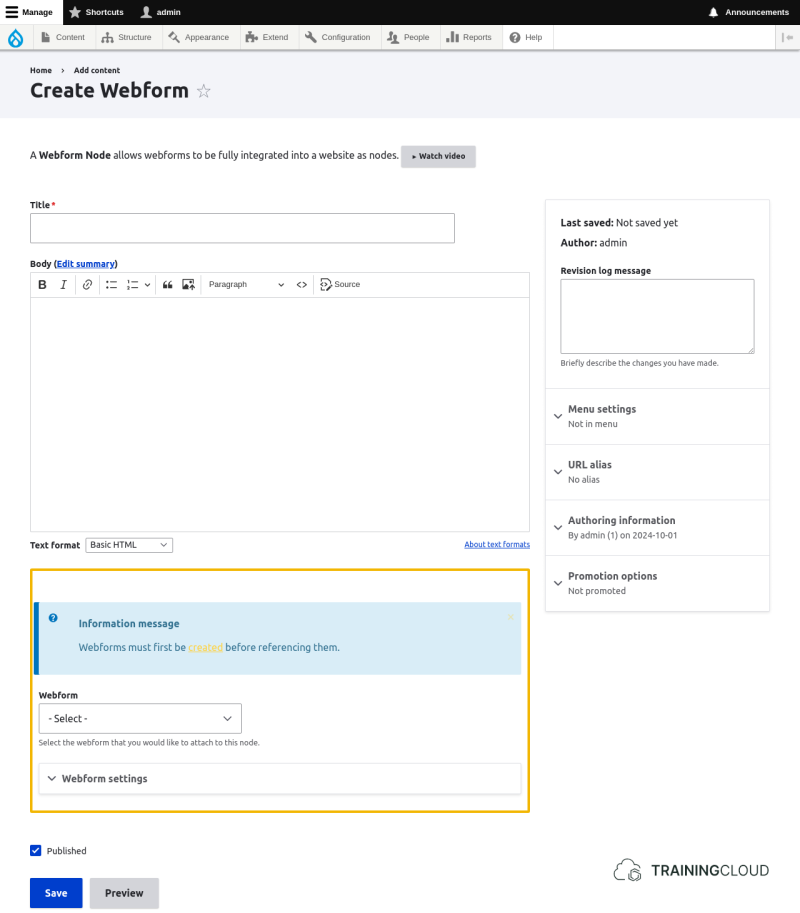
→ The only thing you need to do is specify which webform should be shown.
Activity 2A
- Create a Webform node and make it show the Contact form.
- Use the_body_ field to add contact information such as address, phone number, and opening hours.
- Explore the Webform settings you can configure here.
Activity 2B
In the webform node's settings, you can set the webform to open, closed, or scheduled. You can do the same thing when you configure the webform's general settings.
- Is there a difference?
- When would you set a webform to closed via its general settings?
- When would you set a webform to closed when it's referenced via a webform node?