Remote Post handlers let you send webform submission data to external systems via an HTTP request, when a submission is completed, updated, or deleted.
Use cases
It is impossible to list all the integrations you could build with Remote Post handlers; here are a few examples:
- A newsletter signup webform sends the data to Mailchimp, where the info is used to automatically add or update the subscriber.
- A lead generation webform sends submission data to Salesforce, where a new sales lead is created.
- A support request webform sends submission data to an internal bug tracking system where a new ticket is created, and to a Slack channel for administrators where a new issue notification is posted.
In theory you can send webform submission data to any external system that is set up to receive data in the JSON format (more on that below).
Webhooks
Webhooks, not specific to Drupal, are a popular way for websites to receive data from other systems, without those other systems needing special integration code.
How do webhooks work
The basic principle is:
- Website A provides a webhook endpoint: special URL, such as http://example.com/data/new-issue
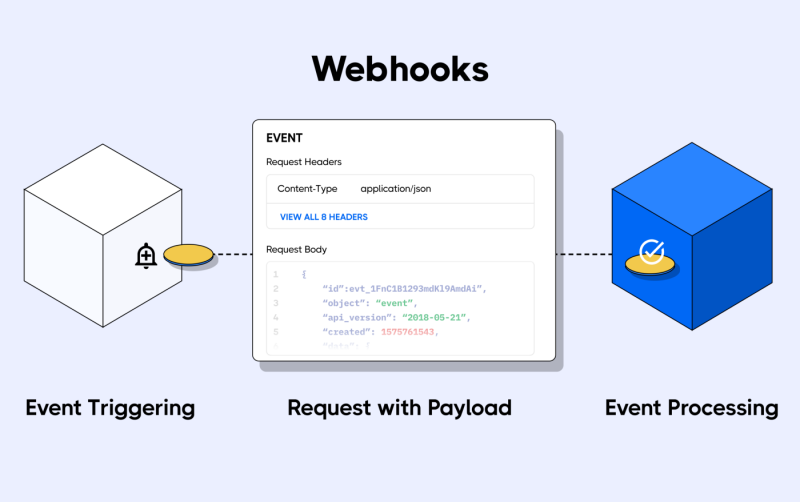
- An event on website B triggers website B to send a special HTTP request that contains the submitted data (also called payload) to site A.
- Receiving the webhook call on its endpoint triggers site A to create a new issue using the received payload data.
Here's a basic diagram to illustrate how webhooks work:
A similar diagram, applied to webform submissions and Remote Post handlers:
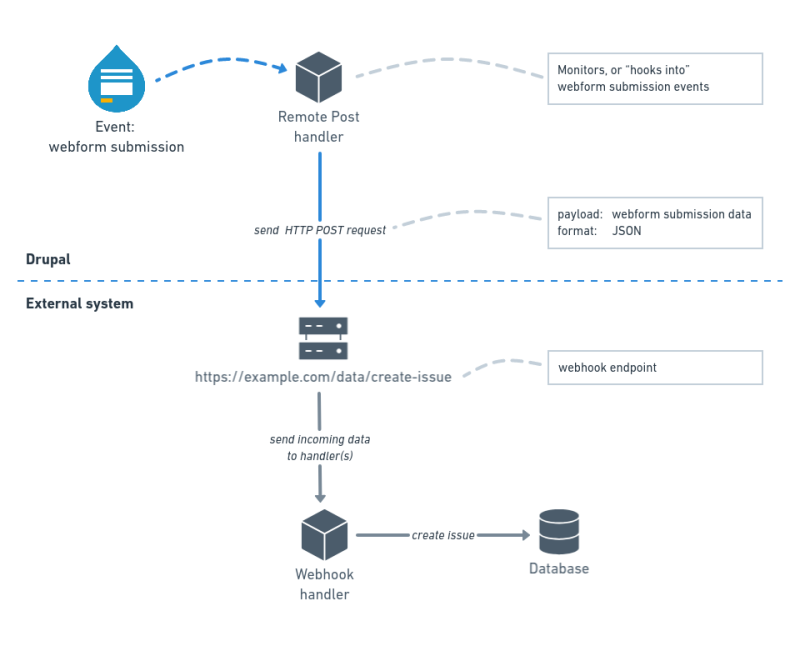
Drupal does not care how the issue is created in the internal system; Drupal's only responsibility is sending the HTTP request (calling the webhook endpoint) and making sure the correct data is sent along in the correct format: JSON.
Luckily, Remote Post handlers automatically send the submitted form data using the JSON format.
This is the power of webhooks: you don't need to know how the external system works internally. As long as it makes a webhook endpoint available, and you send the data in a format that the receiving end understands, your system can interact with it.
Calling a webhook
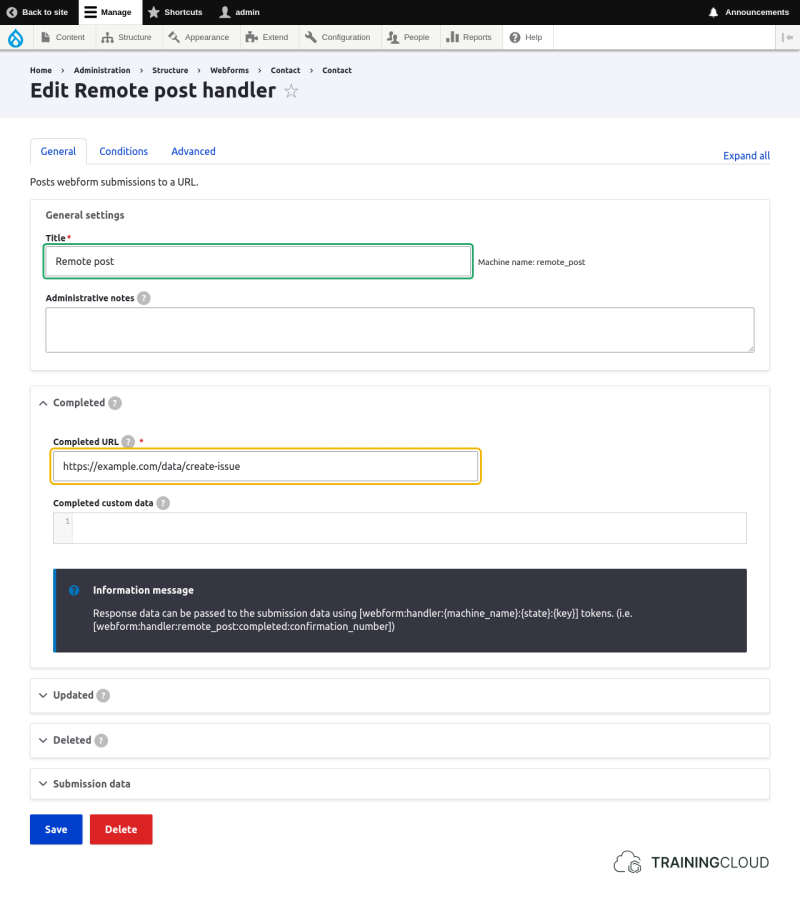
To call a webhook you need to provide the webhook's URL and which type of request it expects (usually HTTP POST):
Testing Remote HTTP requests
So far all this has been very theoretical. Let's see how this works in the real world.
There are a number of free online tools that let you generate unique webhook URLs (endpoints) where you can test your remote HTTP requests.
We suggest https://webhook.site, but you can use any remote site or local tool that is able to accept HTTP requests and display all related information.
Activity 1
- browse to https://webhook.site
- copy the unique URL that was generated for you, and leave the page open
- add a new Remote Post handler to your Contact form
- paste the URL into the Completed URL field
- save
- test your contact form
- switch back to your open webhook.site page
If everything went well, you should see page like the screenshot below:
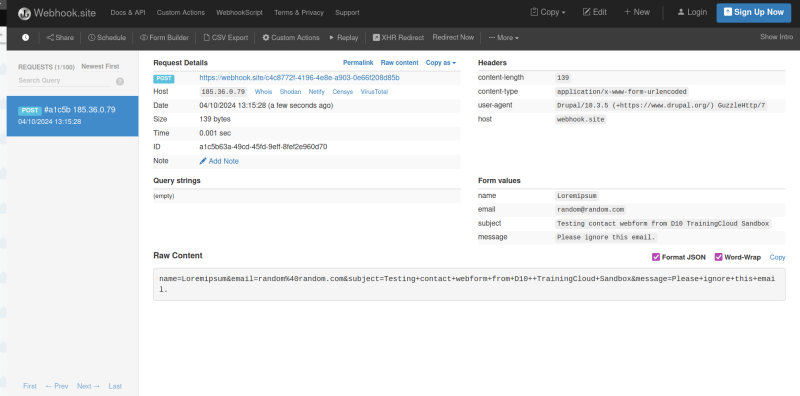
You can see all possible data related to the HTTP POST request that was sent from Drupal, including where the request came from, what its destination URL was, and what data (payload) it contained.
As you can see this is a straightforward way to test Remote Post handlers without actually sending a lot of test data to the real external system you will want to connect to later.
Once your Remote Post handler is correctly configured, you typically change its Completed URL field to the actual webhook URL.
Activity 2
- Update your Remote Post handler and add more data to the payload.
The Submission data fieldset contains all possible data points that are available to you. They include the form element data but also metadata related to the form, the form creator, the entity (usually a block or node) the form may be attached to, and more:
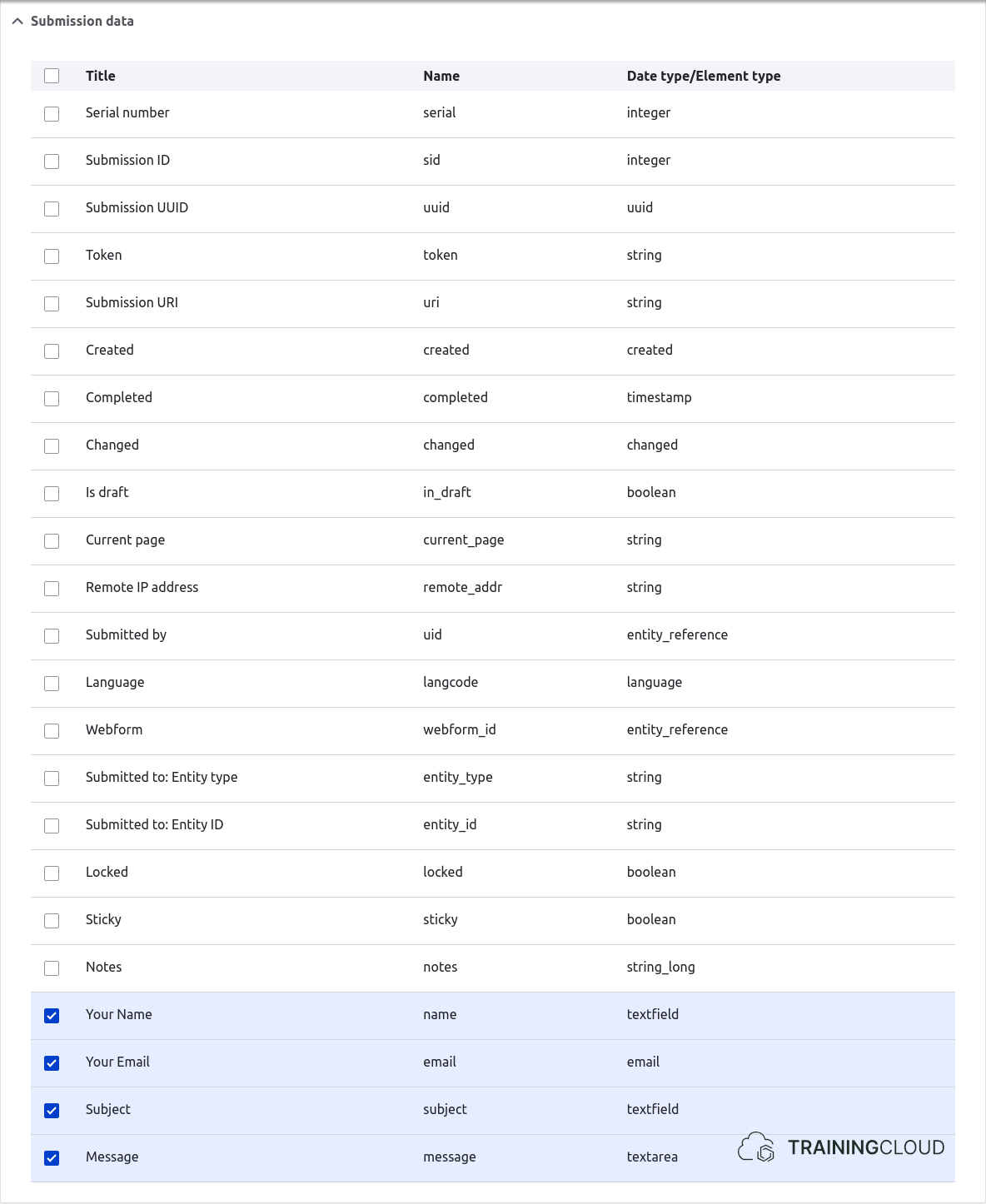
→ Test the webform and use webhook.site to inspect the request and verify that the new data is part of its payload.
End note
Sending data to a remote endpoint is relatively straightforward, as you have learned.
However, real systems that expose webhook endpoints are usually more complex than the ones we've used to test our webform Remote Post handler. You often need to provide some form of authentication data, and your payload (the submitted form data) usually needs to be formatted in a specific way.
Remote Post handlers have advanced options that let you manually add specific data (such as authentication data) to your request, but you have very few options to reformat the data before sending it.
In cases where these endpoints are more complex and/or more secure, there are different options you can choose for making your system work:
- Instead of using Webforms, use a special-purpose module that provides a form + all the code needed to communicate with that specific external site. Examples include modules that integrate with Saleforce, CampaignMonitor, Jira, Confluence, and more.
- Use a module that provides a new type of handler, specifically for the system you want to connect to.
- Code your own handler. Once created, your less technical site editors can use it like any other handler, without having to know the underlying technical details.
Going into more complex scenarios here would take us too far.
What's important to remember is what Remote Post handlers are, how they work, and how you can test them.
Summary
- Webhooks are typically set up to send HTTP requests to external webhook endpoints when events are detected.
- Webform Remote Post handlers:
- detect when a webform is submitted
- send an HTTP Post request, with the submitted webform data as payload
- You can use https://webhook.site or other free online tools to inspect HTTP requests.