Objectives & prerequisites
- Give a definition for "Drupal theme".
- Describe the purpose of a Drupal theme.
- List and briefly describe the key components of a Drupal theme.
- Explain the difference between parent themes and child themes.
- Explain "separation of concerns" in the context of front-end and back-end architecture.
- Explain "separation of concerns" in the context of Drupal themes.
- Basic understanding of HTML, CSS, and JavaScript files and how they relate to each other.
- Basic administrative experience building or managing a Drupal site.
Introduction
A theme is a folder that contains configuration files, code files, template files, and CSS/JS files that control the look and feel of a Drupal site, both in terms of design and - to a certain extent - the layout of each page.
A typical Drupal site uses two themes: one "front-end" theme, used for the visual appearance of all public-facing pages, and one "back-end" theme, optimised for the administration side of the website.
That said, it's perfectly possible - but less common - to use one single theme for both the front-end and back-end parts, or to use multiple front-end themes for different parts of the website.
Drupal core comes with three themes: one front-end theme (Olivero), one back-end theme (Claro), and one minimal theme (Stark) to learn from and/or use as a starting point.
Many more contributed themes are available at https://www.drupal.org/project/project_theme.
Key Components
A typical Drupal theme contains the following components:
- Theme info file
- Theme code file (optional)
- Template files (optional)
- Assets (optional)
- Stylesheets
- JavaScript files
- Graphic elements
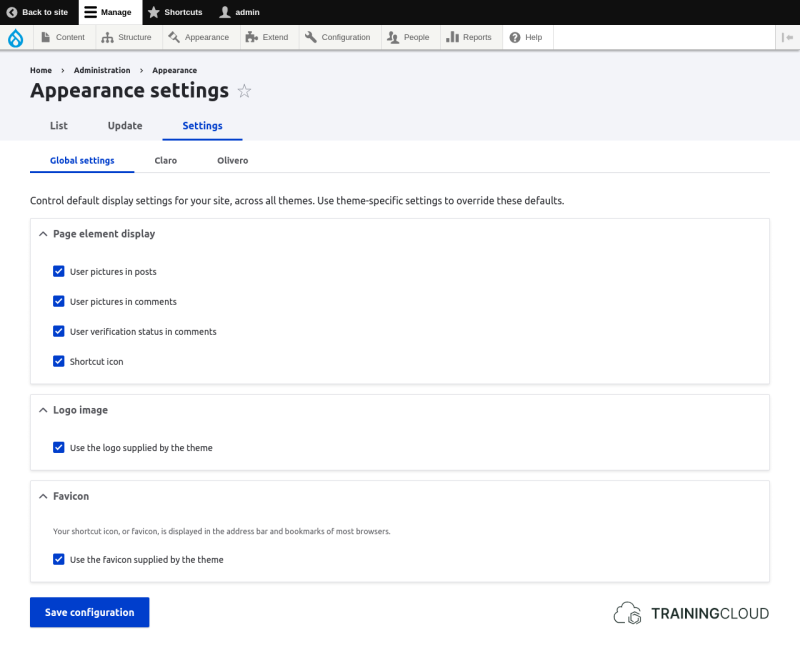
Additionally, a theme can provide things like predefined responsive breakpoints, and custom theme settings that are available to administrative users via Manage > Appearance > Settings:
Theme info file
A theme's info file makes the theme known to Drupal.
Apart from basic metadata such as the theme's name, description, and version, the info file can contain a large number of configuration settings related to dependencies, system requirements, theme regions, and references to CSS and JS files.
Example: mytheme/mytheme.info.yml
Theme code file
A theme's code file contains all of its custom PHP code, typically used to override or extend the way page elements are presented.
Example: mytheme/mytheme.theme
Template files
Drupal uses specific template files to generate the underlying HTML code of pages and all of their components such as menus, headers, footers, blocks, lists, and forms. Themes can override specific template files by providing their own modified version.
Example: mytheme/templates/page.html.twig
Assets
- CSS files provide styling and - to a certain extent - layout.
- JS files provide dynamic functionality such as showing/hiding elements when a button is clicked or refreshing a part of the page.
- Graphic elements such as background images and icons support the theme's design. Functional images like a company's partner logos or images to be shown as part of content do not belong in a theme: editorial images should be managed through Drupal's built-in Media Library system.
Example: mytheme/css/style.css
What about front-end tooling?
Many websites use front-end frameworks such as Bootstrap, Vue, or React, build systems like Gulp, Guzzle, or Webpack, and CSS extensions like Sass or Less.
Naturally the question arises: which framework and front-end tools do I need to know to build my own Drupal themes?
Well, Drupal itself does not depend on specific front-end tools. Themes inform Drupal which CSS and JavaScript files should be loaded and when they should be loaded.
Whether you, as a theme developer, decide to write those asset files by hand or use front-end tools to manage and build them is entirely up to you. Drupal does not care where the asset files come from, as long as they are located where Drupal expects them to be.
Sub-themes
When building a theme, it's possible to start from the ground up or to create a sub-theme or child theme based on another theme.
Any theme can be used as a parent theme, but some are more suitable than others and are often called "base themes" or "starter themes".
Child themes inherit settings, templates, CSS, and JS from their parent theme. They can override or extend any part of the parent theme they inherit from.
What can themes do?
The purpose of a theme is to control the visual appearance of pages and page components without providing any business logic such as access control, data processing, form validation.
Business logic is the set of rules, decision-making processes, and algorithms that are used to operate a business or organisation.
In other words, a theme should only control display logic: how pages look and feel, not where the content comes from or if the current user has sufficient permissions to access it.
While it's technically possible for developers to add business logic to themes, doing so would break the separation of concerns principle and make the website less well-organised, less modular, and less maintainable.
Separation of concerns is an architectural principle in software design that states that distinct parts of a system should only be responsible for their own functionality.
A Drupal theme should be completely independent of a site's overall configuration. It should be possible to switch from one theme to another without losing significant functionality, as all of the application logic and business logic should be defined by custom modules instead of custom themes.
Activity 1
What is the difference between a base theme and a parent theme?
Activity 2
What is the difference between a starter theme and a parent theme?
Activity 3
Can you name the key components of a theme?
Activity 4
Which of a theme's key components are mandatory, and which are optional?
Summary
- Themes control the visual appearance of pages and page components.
- Themes can use any front-end tools and frameworks they want as long as they produce the expected asset files (CSS, JS, graphic elements).
- Themes can be based upon other themes, with child themes selectively overriding or extending parts of their parent theme / base theme.
- Themes should not concern themselves with anything other than display logic.
- The separation of concerns principle states that individual components of a system should only be concerned with their own functionality.
- Applied to Drupal, the separation of concerns demands that themes only concern themselves with how things are presented, not what is being presented nor who is accessing the site.
- Key components of a theme:
- Theme info file
- Theme code file (optional)
- Template files (optional)
- Assets (optional)
- Stylesheets
- JavaScript files
- Graphic elements