Conclusion
Between caching in your web application and caching in your browser, you site's data is likely cached in various other places as well.
Generally speaking, more caching improves the overall performance, but an overly complex caching solution involving many caches cause more trouble than it's worth, and end up costing more money than using fewer but more powerful caches.
This introduction to caching has covered various caching mechanisms that can either be used separately or together. We hope that you are now better equipped join conversations on caching strategies, and troubleshoot caching issues you may encounter.
As a final piece of the puzzle, here's diagram of a hypothetical project that brings together all the types of cache we covered in this course.
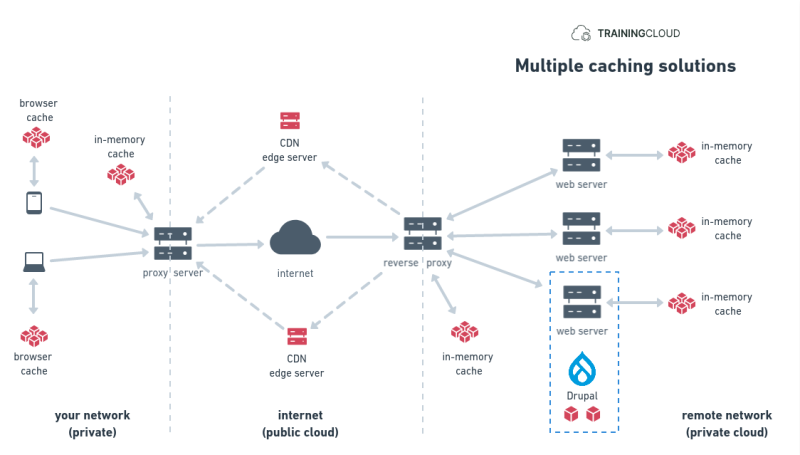
Request / Response flow
- user asks browser to load a web page
- browser checks if it can serve a cached version
- if not, browser sends request to local proxy server
- local proxy server checks if it can serve a cached version
- if not, proxy sends request to the internet
- reverse proxy receives request
- reverse proxy checks if it can serve a cached version (via its edge servers if it's a part of a CDN)
- if not, reverse proxy sends request to internal web server
- web server checks if it can serve a cached version
- if not, web server sends request to Drupal
- Drupal checks if it can serve a cached version
- if not, Drupal rebuilds the web page, caches it, and sends it back to the web server
→ The web server, reverse proxy, CDN edge servers, proxy server, and browser cache all store a cached copy of the web page they received.
Remember that configuration is necessary on every level, and that invalidation of cache entries needs to happen correctly and consistently from the start to the end of the chain of caches.