Introduction
When you build a custom module for your project, you're often doing so because you want Drupal to work differently from how it normally works.
For example, you may want to:
- Redirect a user to a specific page after logging in.
- Show a message to all user who have the "administer" role.
- Add a field to an existing form.
- Prevent articles from being published if they contain racist words.
- Update data in a statistics table every time certain nodes are visited.
- ...
All of these examples follow the same pattern: when something happens, you want to do something.
In other words, when an event occurs, you want to react.
Hooks
Hooks have been a part of Drupal for many years, but started being phased out in Drupal 8, in favor of the newer Event Subscriber system.
There are still some hooks left in Drupal 10, but most (if not all) of them will be replaced by Event Subscribers in the future.
How hooks work
Developers of Drupal core or contributed modules can provide hooks, which other modules can implement by creating a PHP function that follows a certain naming convention.
When core, or a contributed module, provides a hook, it is announcing "I am about to do [something specific], or I have just done [something specific], is there any module that wants to temporarily take over and do something else?".
If a contributed module implements a hook, it is responding to this question, and saying "yes, in fact I want to do something". It then does what it wants to do, and hands control back so normal Drupal operations can resume.
Let's look at an example:
User login example
File: /hello/hello.module
<?php

use Drupal\user\UserInterface;

function hello_user_login(UserInterface $account) {
\Drupal::messenger()->addMessage('Welcome back!');
}
The hook being implemented: hook_user_login()
Our hook implementation: hello_user_login().
Drupal will detect this as a hook implementation because the function follows a naming convention: the name of an existing hook ("hook_user_login") with the word hook replaced by the name of the module ("hello").
In other words:
hook_user_login(...) → hello_user_login(...)
The module is reacting to the fact that someone logged in by showing a message.
Finding all available hooks
You can find all of Drupal core's annotated source code and internal documentation at api.drupal.org.
Searching for "hook_" will result in a list of all available hooks.
If you're looking for hooks provided by contributed modules, you won't find those on api.drupal.org. Instead, use your code editor or file manager to search inside your Drupal project folder for files that contain the word "hook_", or files that have ".api.php" as part of their filename.
Advantages and disadvantages
Hooks are fairly straightforward to implement by creating special functions that follow a naming convention.
One disadvantage of hooks is that it can be tricky to specify or change the order in which hook implementations are called: if several modules implement the same hook, which one goes first? There are ways to deal with this, when necessary, but it adds complexity.
The hook architecture is part of Drupal's legacy procedural PHP code, which as of Drupal 8 is being replaced by Object Oriented code. You can still implement hooks, but sooner or later the entire hook system will disappear.
As such it's a better idea to use Event Subscribers, instead of hooks, where possible.
Event Subscribers
Events and Subscribers follow the Mediator design pattern (not invented by Drupal developers) where Event Subscribers (also called event listeners) execute code when they are notified that certain events have been dispatched.
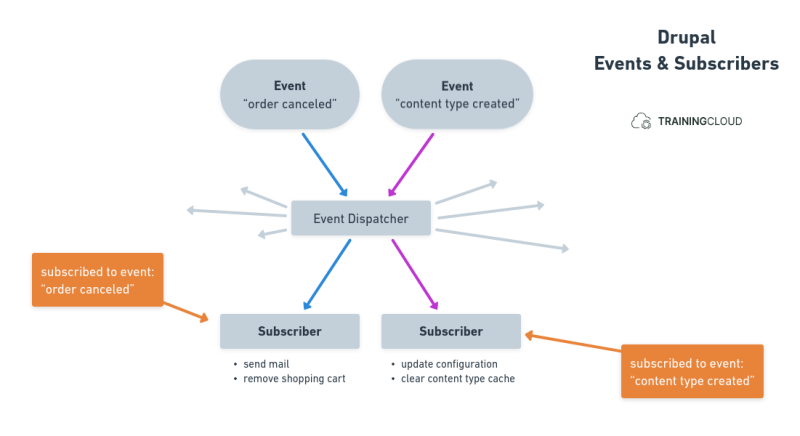
Here's what happens:
- You add an Event Subscriber to your module.
- The Subscriber is configured to subscribe to one or more specific Events.
- The Event Dispatcher notifies the Event Subscriber when the event has been dispatched.
- The Subscriber reacts by executing code.
Let's look at an example:
File: /hello/src/EventSubscriber/ConfigEventSubscriber.php
This snippet creates one Event Subscriber that listens to two specific events:
ConfigEvents::SAVEConfigEvents::DELETE
When it receives a ConfigEvents::SAVE event, the configSave method must be executed.
When it receives a ConfigEvents::DELETE event, the configDelete method must be executed.
The configSave() method retrieves the configuration object that was saved, and prints a status message (= a "normal" green message).
The configDelete() method retrieves the configuration object that was deleted, and prints a warning message (= usually an orange message).
Advantages and disadvantages
Event Subscribers are more robust and more flexible than hooks, and they are Object Oriented.
It can be hard to discover the available events that are dispatched by Drupal core or contributed modules, but that is also true for hooks.
You can find a list of core events at https://api.drupal.org/api/drupal/core%21core.api.php/group/events/
If you want to make your custom code fully Object Oriented today, but are blocked by certain Drupal hooks that have not yet been changed into Events, you can install contributed modules such as Entity Events.
Summary
- Hooks let you react to events in a procedural, non-Object-Oriented way.
- Event Subscribers let you subscribe and react to events in a more modern, Object Oriented way.
- As of D8, all core hooks are being replaced by Events.
- Some contributed modules already provide Event-based alternatives to hooks, ahead of Drupal core's hook replacements.
- You should use Event Subscribers instead of hooks whenever you can.