Introduction
Drupal's open architecture lets developers extend or modify Drupal through custom modules that interact with Drupal via its Core APIs (Application Programming Interfaces):
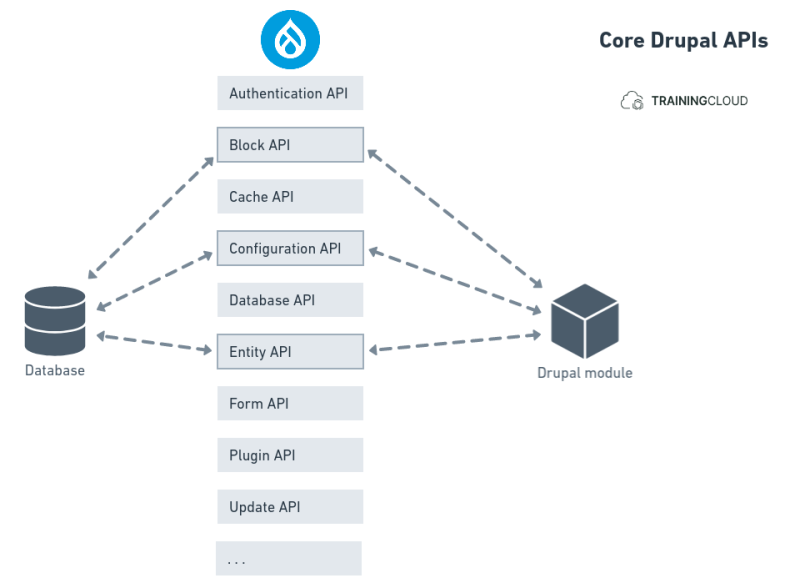
What are APIs?
You can think of an API as a menu in a restaurant. The menu provides a list of dishes you can order, along with a description of each dish. You specify which items you want, and the restaurant’s kitchen does the work and provides you with the finished dishes. You don’t know exactly how the restaurant prepares that food, and you don’t really need to.
Similarly, an API lists a operations that developers can use, along with a description of what they do. The developer doesn’t necessarily need to know, for example, how Drupal stores all the historic data of old versions of content; they just need to know that they can use the API to retrieve a certain version of a page.
Drupal's Core APIs
Here's a list of Drupal's core APIs:
- Authentication API
- Block API
- Cache API
- CKEditor5 API
- Configuration API
- Database API
- Entity API
- Entity Validation API
- Filter API
- Form API
- JavaScript API
- Layout API
- Menu API
- Middleware API
- Migrate API
- Plugin API
- Quick Edit API
- Restful Web Services API
- Render API
- Routing API
- Serialization API
- State API
- Text Editor API
- Tour API
- Translation API
- Typed Data API
- Update API
To learn more about these core APIs, see https://www.drupal.org/docs/drupal-apis.
Drupal's core APIs hide a lot of complex internal logic behind public-facing, well-documented, stable interfaces. This lets Drupal evolve internally as much as it wants, while keeping the public-facing APIs stable so module developers don't need to update their code every time there's a change in Drupal core.
Using an API
What does it mean to use an API?
Here's an example of how to figure out which user created node/123:
$node = \Drupal::entityTypeManager()
->getStorage('node')
->load(123);

$user = $node->getOwner();
$author_name = $user->getDisplayName();
And here's a slightly different version of this code, to use in a custom block that you place in the sidebar, so you have a way of showing an article's author info the sidebar, instead of under the article title, for instance.
$node = \Drupal::routeMatch()
 ->getParameter('node');

$user = $node->getOwner();
$author_name = $user->getDisplayName();
In the first code snippet we retrieve a specific node (123); in the second snippet we use the RouteMatch service (part of the Routing API) to figure out which page the user has just requested, and load the associated node.
(Real world code would be a bit more complex, follow strict code standards, and also deal with pages that don't represent nodes, for instance, but for now we're keeping things as basic as possible).
These short Drupal code snippets illustrate how you can retrieve content- and user-related information using the Entity API, without knowing how or where the data is stored.
Without these APIs, you would have to understand Drupal's underlying data model, know how to work with historic content revision information, know how to write SQL and construct queries join multiple tables together, and know how to execute those queries and retrieve the results.
And if Drupal core decides to improve the underlying way data is retrieved from the database, these code snippets don't need to change, because the public-facing APIs hide the underlying complexity.
Clearly, well-built and well-documented APIs can make every developer's life much easier.
Activity
- Add a block plugin to your Hello module:
- Create an empty file named
AuthorBlock.phpto the module's/src/Plugin/Block/folder. - Copy paste the code (below) into that file, and save.
- Clear your caches (!).
- Add the new block to the sidebar, and configure it to only display on Article pages.
File: /hello/src/Plugin/Block/AuthorBlock.php
<?php
namespace Drupal\hello\Plugin\Block;
use Drupal\Core\Block\BlockBase;
/**
* This block prints the current node author's name.
*
* @Block(
*   id = "hello_author_block",
*   admin_label = @Translation("Author block"),
* )
*/
class AuthorBlock extends BlockBase {
 public function build() {
   $node = \Drupal::routeMatch()
          ->getParameter('node');

   $user = $node->getOwner();
   $author_name = $user->getDisplayName();

   return [
     '#markup' => 'Author: ' . $author_name,
   ];
 }
}
If everything went well, you should see the author's name appear in a block next to each article.
Summary
- Drupal provides several core APIs, specifically designed to let module developers use, extend, or override Drupal functionality.
- APIs provide a safe and controlled way to interact with a code base.
- APIs hide underlying implementations and complexity behind an easier to use list of classes and functions.