Some default Metatag patterns extend or override other default patterns.
For example: the Content Metatag patterns override and/or extend the Global Metatag patterns.
But what if you want to set default Content patterns AND want to be able to override these patterns on a node-by-node basis, similar how you can override Pathauto patterns for individual nodes?
Overridding meta tags on individual entities
To enable the ability to override meta tags on individual nodes / terms / users / etc, you need to add a new field of the type meta tags to your content type / vocabulary / account type.
Once that field is added, new configuration options become available when you edit individual nodes/terms/users.
Step 1: add a meta tags field
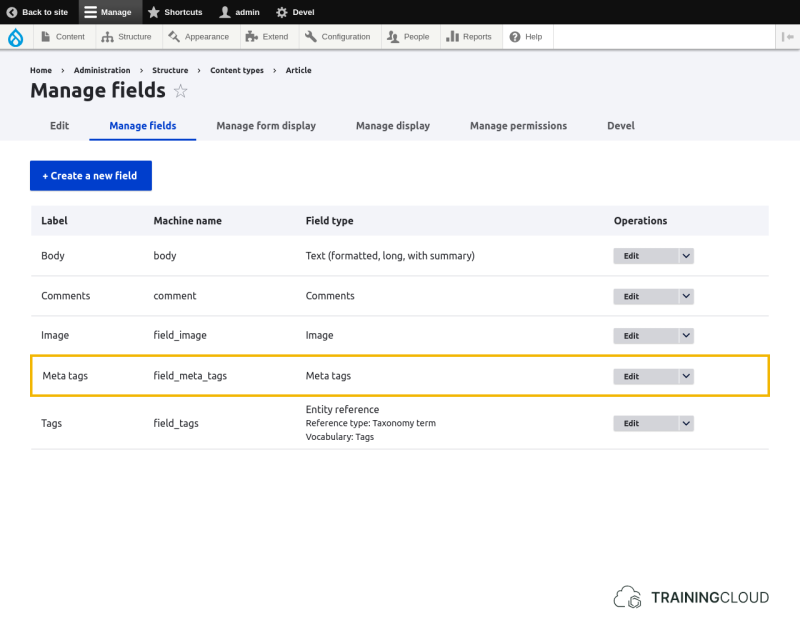
Other than the field label and description, there is nothing to configure in the field settings itself.
Step 2: Edit an entity to override its metatag patterns
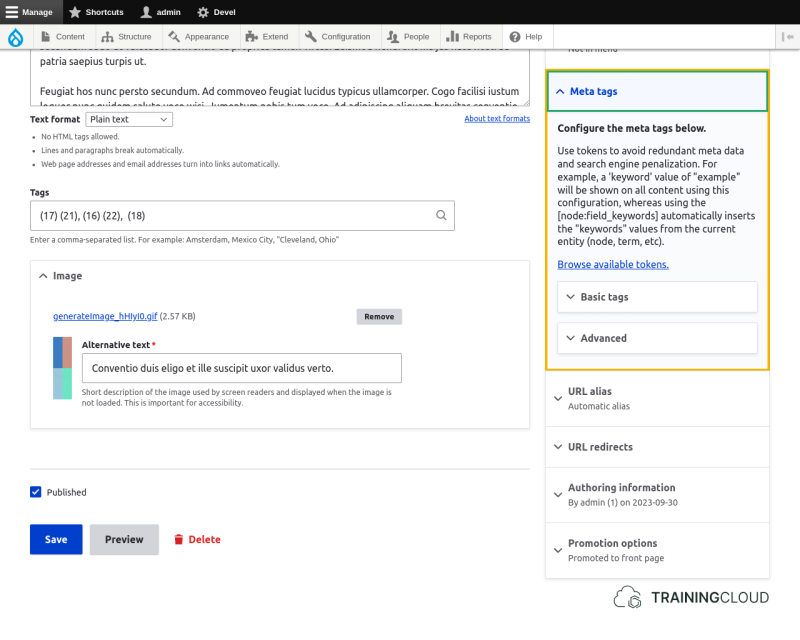
Once you've added a field of the type meta tags to your content type, a new fieldset Meta tags appears when you edit a piece of content.
By default it offers two sets of patterns:
- Basic tags
- Advanced
Activity 1
- Add a meta tags field to the Article content type.
- Edit any article, or create a new one
- Open the Meta tags fieldset and explore the patterns that are available in the Basic tags and Advanced fieldsets.
Activity 1B
- Edit any article or create a new one
- In the Advanced Metatags fieldset:
- Set 'Geographical place name' to the name of a city.
- Add a few keywords to 'News Keywords'
Save the article, reload it, and view source.
Do new metatags appear for the values you just added?
Activity 2
You've now explored the Basic and Advanced meta tag fieldsets.
Assume you decide you only want to be able to override the Basic meta tags, and that the Advanced fieldset should not be shown at all.
How would you proceed? We have not discussed this yet, but you can find how to do this if you explore the Metatag module a bit more.
Hiding Basic / Advanced meta tag options
When you add a field of the type Meta tags to a content type, the Meta tags fieldset appears on the add/edit pages for that content type. It contain the Basic and Advanced fieldsets that let you override the default Metatag patterns for that content type.
To hide either the Basic or Advanced meta tag fieldsets, you need to make some changes to the Metatag configuration at Manage > Configuration > Search and metadata > Metatag > Settings:
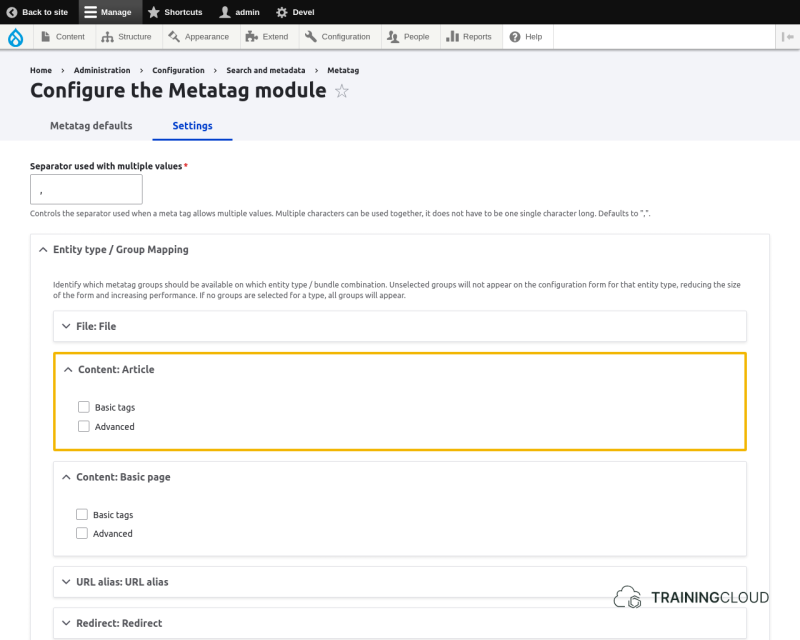
- To show the Basic tags, select Basic tags.
- To show the Advanced tags, select Advanced.
- To show both, select both, or select none. (The help text clarifies that selecting none has the same effect as selecting all of them.)
Activity 3
Assume you don't want to see these metatag options at all when you edit entities, and just want to rely on the defaults set on the Metatags management page.
How would you achieve this?
Summary
- Add a 'meta tags' field to let editors override meta tags on individual entities.
- The Metatags configuration page lets you specify whether you want to show basic tag options, advanced tag options, or both.