Introduction
Drupal's core philosophy is that its functionality and output are meant to be extended and/or overridden.
Just like back-end developers have specific mechanisms to extend or override Drupal's standard behavior, front-end developers can use template files, preprocessing functions, and theme hooks to override Drupal's standard output in a safe and controlled way.
Template Files
When Drupal assembles a typical page for output, it uses dozens of theme functions and small Twig template files to render the individual parts.
Each page type, content type, node, region, block type, block, table, list, image, … has its own template file, or shares a template file with similar objects.
From the overall page layout to the rendering of an image, template files are the key to telling Drupal exactly which HTML markup you want to generate.
Let's break a simplified page down into parts with matching template files:
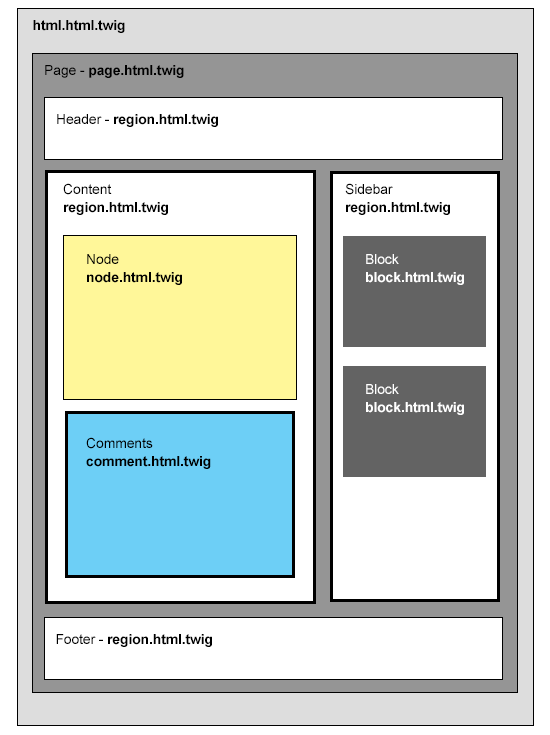
The page rendering mechanism (simplified)
To build the output of each individual page part (a menu, a sidebar, a block, or even an individual field), Drupal goes through the following process:
- gather the data that needs to be shown
- select the most appropriate template file to use
- combine the data and the template file into a chunk of HTML
When all the page parts have been rendered individually, Drupal combines them all into a proper HTML page, and returns that to the requesting browser.
As a Drupal themer you will spend a lot of your time overriding template files so you can make Drupal generate the HTML markup you want.
Overriding a template file
Never modify Drupal's source code directly; if you do so you risk making Drupal unstable, and your changes will be lost the next time you update Drupal.
The theme system lets you tell Drupal to use your alternative template files instead of the standard ones.
To override a template file:
- Figure out which template file you need to override.
- Copy the template file into your theme's
/templates/directory. - Clear your cache.
When Drupal needs to render something, it first checks if there is a suitable template file present in the current theme's directory.
If it doesn't find a suitable template file in the current theme's directory, it checks in the base theme's directory (more on base themes later).
If it still hasn't found a suitable template file, it falls back to the default template file, present in the directory of the core module involved.
Example
If you want to find a template related to rendering comments, the comment module at /core/modules/comment is the best place to look.
→ This process of looking through different directories for suitable things to override may be confusing and complicated at first. But stick with it - you'll be doing this very, very often, and we promise it does get easier.
Template specificity and naming conventions
As you may have concluded, Drupal uses a naming convention to let you indicate the specificity of your template files.
For every page part it needs to render, Drupal will go through a number of possible template file names - from very specific to very generic, and uses the first one it finds.
See also: Twig template naming conventions (drupal.org)
Summary
- Pages consist of many different components.
- The markup of many of these components is defined in Twig template files.
- Default template files are provided by the core/contrib module that provides the components.
- You can override a template file by copying it into your own theme and modifying your copy.
- Drupal will first look for template files in the currently active theme's directory; if it doesn't find any, it will look elsewhere.
- Drupal uses a naming convention to let you indicate the specificity of template files.