Introduction
A theme is a set of configuration files, template files, and front-end assets such as CSS files, JavaScript files, images, and icons, all grouped together in a directory.
Themes define the look and feel of a Drupal site. They:
- include the right CSS and JS files where necessary
- use template files to extend or override the default styling of page elements (pages, nodes, blocks, form fields, tables,...)
- let you programmatically modify or extend data right before the final output is built
Anatomy of a theme
Let's have a look at an imaginary, basic theme named silver:
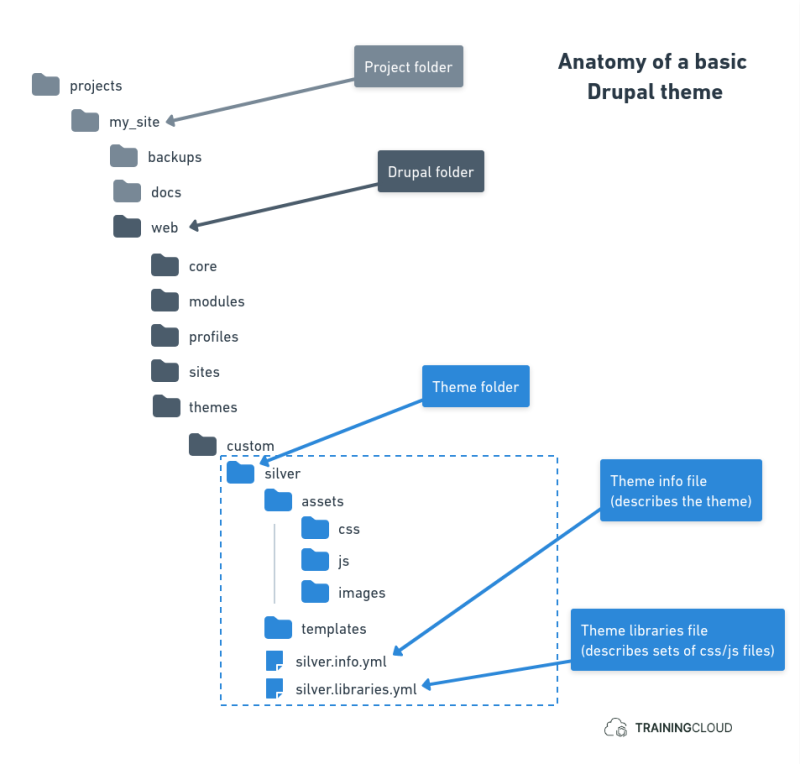
Just like modules, themes are folders that contain certain mandatory and optional files, placed in certain locations where Drupal can find them.
Where to place themes
→ Third-party themes should be placed in /themes/contrib/.
→ Custom themes should be placed in /themes/custom/.
Themes can be located in other places as well, depending on the situation:
- inside
/core/for themes that are part of Drupal core - inside
/profiles/for themes that are part of installation profiles - inside
/sites/if you are using a multisite setup
Most of the time you will place themes in the standard /themes/ folder.
Theme files
You find a number of different types of files in a theme:
The theme info file
A theme's info file describes the theme, lists dependencies, declares theme regions, specifies which CSS and JavaScript to load, and more.
The info file follows a naming conventing (theme_name + .info.yaml) and uses YAML syntax.
A minimal example:
File: /silver/silver.info.yml
name: Silver
description: "A minimal theme with silver and gray colors."
type: theme
core_version_requirement: ^9 || ^10
base theme: stable9
libraries:
 - silver/global-styling
 - silver/global-scripts
This file declares the following:
- the name and description
- the fact that it is a theme (as opposed to a module)
- the fact that it is compatible with Drupal 9 and 10
- the fact that it is built upon the core Stable9 theme
- which set of CSS/JS files should be loaded on every page
Info files also specify which theme regions are available. If the file does not specify any regions, Drupal's default theme regions are used.
If your theme does not have an info file, Drupal will not be able to discover the theme, and you will not be able to install it.
Asset files
Themes always provide their own CSS styles, and usually also JavaScript and images (backgrounds, icons, logos, ...). These are called assets or asset files.
These are often placed in an /assets/ folder by convention, but you are entirely free to structure your assets however you want: in one folder, separated into multiple folders, ... it's all up to you.
Libraries file
The libraries file is a YAML file that specifies which CSS and/or JavaScript files should be loaded in various situations.
Within the context of theme libraries, a "library" is defined as a set of CSS and/or JavaScript files. Often a global library is defined to load the same set of CSS and/or JavaScript files on every page.
In addition, other sets of CSS/JavaScript files can be grouped into libraries to only load them on specific pages, such as CSS/JavaScript related to forms, which should only loaded on pages that have forms on them.
Let's look at an example:
File: /silver/silver.libraries.yml
global-styling:
 version: 1.x
 css:
   theme:
     assets/css/style.css: {}
     assets/css/colors.css: {}
     assets/css/print.css: { media: print }
global-scripts:
 version: 1.x
 js:
   assets/js/silver-effects.js: {}
This file declares the following:
- A library named global-styling, which contains 2 CSS files located at
/assets/css/ - The "print.css" file should only be loaded when the webpage is being printed.
- A library named global-scripts, which loads a single JavaScript file at
/assets/js/
To instruct the theme to load these global libraries on every page, the following is typically included in the theme's info file:
libraries:
 - silver/global-styling
 - silver/global-scripts
Telling Drupal to only load certain libraries on certain pages is more complex, depends on several factors, and is not done in the info file. We will not go into further detail here.
There are many more things you can specify in your library definitions, but those go beyond this mini-course as well.
Template files
Drupal uses template files and theme functions to style every element you see: pages, regions blocks, nodes, tables, images, forms, links, ... you can provide styling for almost every individual type of element you find on a web page.
A theme's template files are usually placed in a /templates/ subfolder, and often grouped into other subfolders like "content", "layout", "views", and so on. However, Drupal does not impose any structure - you're free to organize your template files however you want.
As of Drupal 8, template files use the Twig template language, a mix of html and special tags.
An example of a Twig file:
File: /core/modules/system/templates/html.html.twig
<!DOCTYPE html>
<html{{ html_attributes }}>
  <head>
    <head-placeholder token="{{ placeholder_token }}">
    <title>{{ head_title|safe_join(' | ') }}</title>
    <css-placeholder token="{{ placeholder_token }}">
    <js-placeholder token="{{ placeholder_token }}">
  </head>
  <body{{ attributes }}>
    {#
      Keyboard navigation/accessibility link to main content section in
      page.html.twig.
    #}
    <a href="#main-content" class="visually-hidden focusable">
      {{ 'Skip to main content'|t }}
    </a>
    {{ page_top }}
    {{ page }}
    {{ page_bottom }}
    <js-bottom-placeholder token="{{ placeholder_token }}">
  </body>
</html>
The above example shows the default html.html.twig template, which is used as the outer-most template of all pages Drupal generates. Twig tags like {{ page_top }} are variables that are replaced by real values when each page is being prepared for display.
We cover Twig and template files in a bit more detail later.
Front-end framework / build files
Drupal does not impose any front-end approach, framework, or build tools (npm, webpack, gulp, guzzle, ...). It's entirely your choice to write your CSS file(s) by hand, use something like Sass to compile them, use a framework like Bootstrap or Material design.
What's important is that you specify in your asset libraries file which CSS / JS files to include under which conditions. Generating those files, if that's what you choose to do, with the tools of your choice, is your responsibility.
Summary
- Themes are similar to modules.
- A theme is a folder with specific mandatory and optional files, placed in a specific location where Drupal can find it.
- The theme info file describes the theme, makes it discoverable, and can contain a lot of additional configuration.
- Theme libraries are arbitrary collections of CSS/JS files that are loaded globally (on each page) or only on specific pages.
- Template files use the Twig syntax, and are usually found in the theme's
/templates/folder. - You can include any CSS or JS you want.
- You can use any front-end framework or build system, as long as you correctly add the (compiled) CSS and JS filenames to the right theme libraries so Drupal can include them when necessary.