Objectives & prerequisites
- Print a variable in a Twig template.
- Describe the difference between a variable and an expression.
- Print an expression in a Twig template.
- A first experience working with HTML.
- Awareness of basic programming concepts such as variables, if-then-else logic, and loops.
Overview
You can print variables in Twig template by using the {{ }} delimiters:
<p>
 Hi, {{ username}}. You have {{ num_unread }} unread messages.
</p>
<p>
Total messages: {{ num_unread + num_read }}
</p>
Where do the variables come from?
When an application wants to render a Twig template, here's how it instructs the Twig engine to do so:
$output = $twig->render('some-template.html.twig', $variables);In other words, the application:
- tells the Twig engine which template file needs to be compiled
- passes along an array with all the necessary variables so Twig can substitute variable placeholders like
{{ some_var }}with actual values (like$variables['some_var']) it received..
→ If you use Drupal you can modify the variables before they're sent to the template by using preprocess hooks. Refer to the materials on preprocess hooks to learn more.
For now the most important thing to know is that you can use variables in your Twig templates, but only those variables that have been passed along.
Experimenting with Twig: Twig Playground
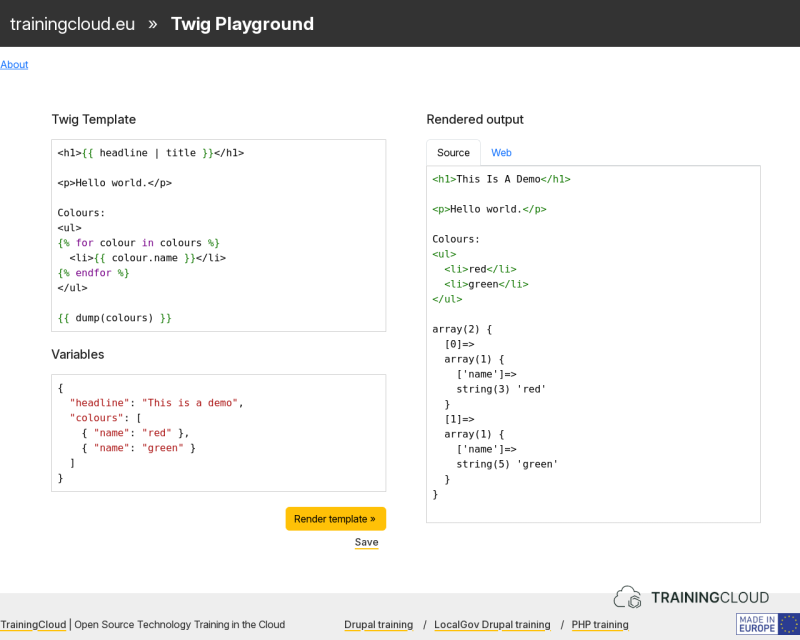
Online coding playgrounds like our Twig Playground let you experiment with Twig syntax without having to create an account or install any software.
Twig Playground lets you experiment with Twig template code, and gives you the opportunity to send along variables, just like applications do when they want to render Twig templates.
The screenshot shows the starting point of a Twig Playground session:
- Your Twig template code goes in the top-left Twig template area.
- The variables that you want to inject into the template go in the bottom-left Variables area.
- The rendered HTML markup is automatically shown in the right-hand side Rendered output area.
We strongly encourage you to use Twig Playground to type out the examples, work on the activities, or just experiment and see what happens.
You can even share your Twig Playground experiments with others by clicking the "Save" button and sending around the new URL that appears in the Twig Stack.
Activity 1A
Open Twig Playground in your browser. In the Twig template area, change the <p> tags to <div> tags.
The Twig code should be:
<h2>{{ headline | title }}</h2>

...
The rendered output should become:
<h2>This Is A Demo</h2>

...
Activity 1B
You want to change the name of the variable from headline to article_title while keeping the rendered output the same. To achieve this result you need to make two changes.
Which changes do you need to make?
Activity 2A
What do you think will happen if you try to print a Twig variable that has not been made available to the template - in other words: what will happen when you try to print an undefined variable?
Open Twig Playground and set up a scenario where your template uses a variable not defined in the variables area.
Activity 2B
What will happen if you define variables that you don't actually use in your template?
Open Twig Playground and set up a scenario where you define one or more variables in the Variables area, without using them in the template.
Variables vs Expressions
Until now we have discussed printing single variables:
Hello {{ username }}.However, you can also print expressions.
In the field of computer science, an expression is typically defined as: a combination of values, variables, operators, and functions that can be evaluated (executed) to produce a single value.
Expressions are typically used to perform calculations and manipulate data.
Every computer language has its own rules for creating valid expressions. Let's look at a few examples of valid Twig expressions.
Examples of printable Twig expressions
{{ 12 }}→ output: 12
{{ 7 - 3 }}→ output: 4
{{ 2 * (5 - 2) * 3.14 }}→ output: 18.84
{{ message }}→ sample output: Hello World!
{{ user.first_name }}→ sample output: Isabela
{{ user.first_name | upper }}→ sample output: ISABELA
{{ ['apple', 'banana', 'coconut', 'durian'] | last }}→ output: durian
{{ first_name ~ ' ' ~ last_name }}→ sample output: Rosa Solveig
{{ get_user_preference('font_family') }}→ sample output: Times New Roman
These examples are a mix of single variables, mathematical expressions, or the result of Twig filters or Twig functions.
They all have one thing in common: they all evaluate to a single value that can be printed.
Examples of non-printable Twig expressions
To make the previous point extra clear, here are a few examples of expressions that do NOT evaluate to a single value and therefore can NOT be printed in Twig:
Example 1: attempting to print a Twig sequence
{{ ['rock', 'paper', 'scissors'] }}→ Output: Array
→ Warning: Array to string conversion.
Example 2: attempting to print a Twig mapping
{{ {'name': Maryia, 'city': 'Kyiv'} }}→ Output: Array
→ Warning: Array to string conversion.
Explanation
Twig can not simply print sequences (arrays without keys, only values) or mappings (both arrays with keys and values, and PHP objects are considered mappings).
Both sequences and mappings are iterable: you can iterate or loop through them. You can only print a variable that holds multiple values by looping through them and printing each value separately.
From now on we'll refer to sequences and mappings as lists (of values) to keep things as simple as possible.
See the materials on Twig loops to learn how to loop through lists.
Activity 3
If a list of values only contains one value, can you print it like you would print a single value?
Summary
- Use
{{ }}to print something in a Twig template. - You can print single values, or expressions that evaluate to a single value.
- Expression: a combination of values, variables, operators, and functions that, together, evaluates as a single value.
- Lists of values (sequences, mappings) cannot be printed like single values. Loop over the list and print each value separately.