Introduction
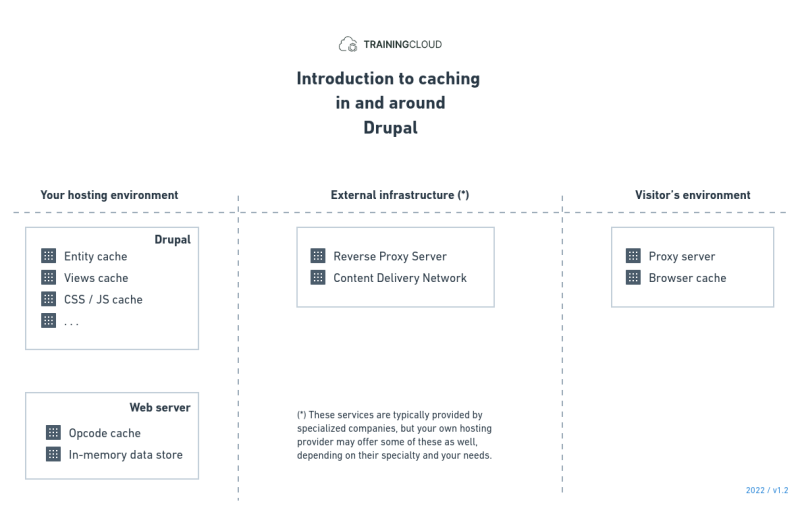
Caches are used to speed up web applications, and exist in many different places in a web application's architecture.
We'll first look at different cache mechanisms inside Drupal; afterwards we'll look at external caches.
The goal of this introduction to caching is to give you an overview different cache mechanisms and how they affect site builders and visitors.
What are caches
A cache is a component that stores data so that future requests for that same data can be served faster.
Although we are discussing caches in the context of web applications, caches exist in different places as well: hard disks, processors, and even memory chips have their own caches.
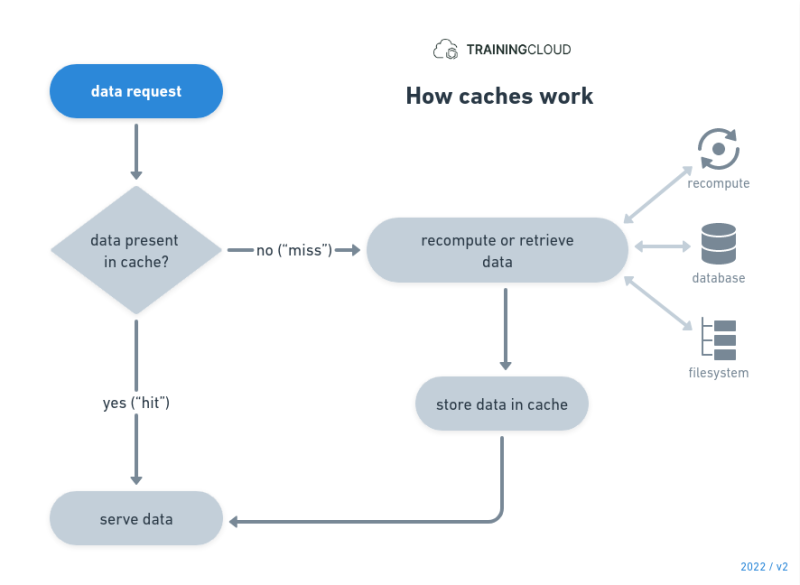
All these types of cache fundamentally work the same way:
Cache hits and misses
A cache hit happens when the requested data is found in a cache; a cache miss when that data isn't found.
Cache hits are served by reading and serving data from the cache, which is faster than recomputing a result or reading from a slower data store.
Example:
Retrieving data from a database is slower than retrieving the same data stored in-memory; by storing some data (such as partially built pages) in an in-memory database such as Redis or Memcached instead, page loading times can be significantly improved.
The more requests that can be served from the cache, the faster the system will perform. Of course, this is only true as long as accessing the cache is faster than recomputing and/or accessing data from the standard data store.
Clearing / invalidating caches
Individual pieces of data that are stored in a cache are called cache entries.
Stale cache entries (outdated entries) are removed from the cache and replaced. Replacement either happens immediately, or the next time a cache entry is requested.
Removing or replacing entries from a cache is called cache invalidation, or invalidating cache entries.
Removing all entries from a cache is called clearing or flushing a cache.
Cache busting
Cache busting is the act of forcing a cache to invalidate a cache entry and serve a fresh copy of the requested resource.
Example:
Let's say your page is using an image named logo.png, and your cache is set to invalidate cached images after 24 hours.
You now want to immediately show an updated logo.
If you just replace the image file, it's likely the CDN will keep serving the old file until the 24 hours are over, and a fresh copy of the file is fetched.
One cache-busting technique is to change the image path in your source code to something like /images/logo.png?v=8355987. The additional parameter is ignored by browsers, so it's still a valid image path, but the CDN will now automatically cache this new version of logo.png because, to a CDN, /images/logo.png and /images/logo.png?v=8355987 are two different resources.
These cache-busting URL parameters are often added by front-end build tools automatically. Drupal also regenerates and adds them to all resources after you've cleared all caches.
Note that this also works with full URLs: if you know you are seeing a cached version of example.com, there's a good chance you can see a fresh copy by visiting a URL like example.com?123abc that is unlikely to already be cached.
How is caching relevant in Drupal
Building output in Drupal is very resource-intensive. Drupal needs to deal with a long list of parameters and perform dozens or even hundreds of database queries when it assembles each page.
Without caching, all these database queries would be necessary every time a visitor requests a page. Even if multiple people need to be served the exact same page at the same time, Drupal would still have to go through the same build process multiple times, wasting precious time and resources.
You can see that a good caching strategy is crucial if you want your site to load quickly and reliably, and avoid having to pay for bigger servers as the server load increases.
Summary
- Caches store data so that future requests for that same data can be served faster.
- When requested data is found in a cache, a cache hit occurs.
- When requested data is not found, or it is out of date, a cache miss occurs.
- When a cache miss occurs, the requested data needs to be recomputed or fetched again from its source.
- Individual pieces of data stored in a cache are called cache entries.
- Outdated cache entries are called stale entries or stale data.
- Clearing a cache is called invalidating a cache (or cache entry).
- Cache busting lets you force caches to retrieve and serve fresh content by manipulating the resource's URL.
- Drupal needs to compute a lot of things and sends a lot of queries to its database, so a good caching strategy is important.